Have ChatGPT audit your website: method, prompts and limitations
ChatGPT can provide an initial assessment of a website if you supply the right information, ask useful questions and review its recommendations before applying them.
Asking ChatGPT to audit your website can help with an initial assessment: clarify what is confusing, identify missing information, improve a homepage, prepare SEO questions or turn a vague impression into a list of issues.
The risk is to confuse this first reading with a full audit. An AI can respond convincingly even when it has not seen the right data. It can propose to modify a title, structure, SEO page or button without knowing whether this page is already receiving traffic, whether the form works, whether the WordPress site is backed up or whether a modification can break something.
Use ChatGPT as an assistant for the initial assessment. Give it the right information, request a structured analysis, then check its recommendations before acting. The aim is to identify what needs correcting.
Central idea
A good AI audit depends mainly on what you provide.
If you only give a URL and a vague request, you will often get a general answer. If you give the context, the objective, the text of the page, the available data and the symptoms, the analysis becomes much more usable.
What ChatGPT can audit correctly
ChatGPT is useful when the problem is read in the content, in the structure of a page or in the way you describe the site. It can play the role of a critical reader, reformulation assistant or idea ranking tool.
01
Clarity
Promise, target, main message, immediate understanding.
02
Structure
Order of sections, titles, missing information.
03
Conversion
Trust, evidence, objections, calls to action.
04
SEO
Useful questions, search intent, layout.
05
Brief
Clear summary to be transmitted to a service provider.
To go further on the general logic, the article using AI to improve your website details possible uses, limitations and how to transform recommendations into priorities.
What to prepare before requesting the audit
The quality of the response depends directly on the quality of the briefing. Before launching the audit, gather the elements that will allow AI to understand the site instead of guessing.
The URL of the page or site, with the context of the activity.
The main text of the page: title, introduction, sections, buttons and FAQ.
The real goal: to obtain requests, sell, reassure, recruit, inform.
The target audience and frequent objections before contact.
Available data: impressions, clicks, page views, conversions and mobile speed.
Symptoms observed: few contacts, slow site, dubious form, confused page.
Recent changes: redesign, plugin added, migration, change hosting.
Constraints: pages to preserve, offers not to change, tone to respect.
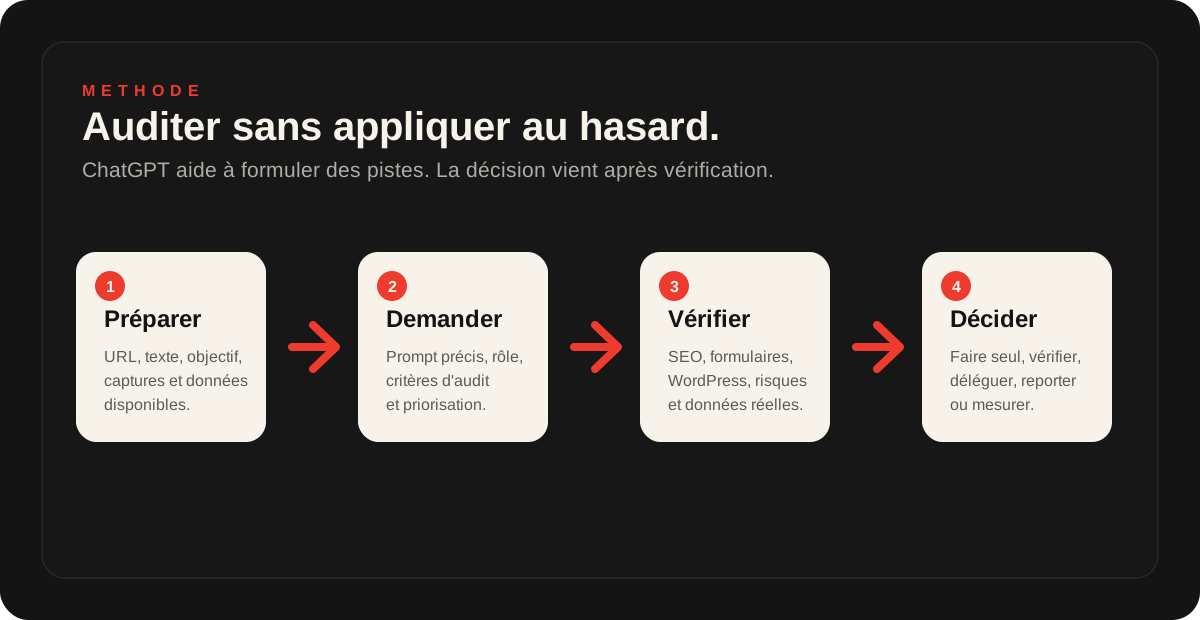
Prompt 1: Request a global diagnostic review
Start with a broad, clearly defined request. Rather than just asking for a website audit, ask for an assessment of objectives, visible problems, risks and priorities.
Prompt to copy
Analyze this website page as a web consultant. Here are the context, purpose, target audience and page text. Identify: 1. what is clear, 2. what is missing, 3. what could undermine trust, 4. what could prevent contact, 5. SEO risks, 6. the five corrections to prioritise. Rank recommendations by impact and ease of implementation.
Prompt 2: Auditing a Home Page
The homepage often poses a problem of clarity. It must quickly make clear who you are helping, what you are proposing, why you are credible and what action you will take afterwards.
Prompt to copy
Read this homepage. Tell me if a visitor understands in less than 10 seconds: the activity, the target, the benefit, the intervention area, the proof of trust and the action to be taken. Then list the sections to be clarified, the missing information and the three changes that can most improve contact requests.
Prompt 3: Check an SEO page
For a page already indexed, be careful. AI may offer to enrich or reorganize content, but it does not always know already positioned queries, competing pages or the historical Search Console.
Prompt to copy
Analyze this page from an SEO perspective. Do not suggest keyword stuffing. Identify the search intent, questions the page already answers, missing questions, vague sections and risks of substantially changing the page. Propose an improved outline, then explain what to check in Search Console before making changes.
Prompt 4: Understand why the page does not convert
If the site receives visits but few requests, the audit must look at trust, evidence, objections and forms. The brake can come from something other than traffic.
Prompt to copy
Analyze this page with a conversion goal. What could prevent a qualified visitor from contacting me? Check the offer's clarity, trust, evidence, objections, calls to action, forms, information hierarchy and points of friction. Finish with three lists: things I can do myself, things to check and things to delegate.
Prompt 5: prepare a WordPress diagnostic review
For WordPress, ChatGPT can help formulate symptoms. On the other hand, you should not copy and paste code or modify the site in production without backup. The proper use is to prepare a clear request.
Prompt to copy
Help me prepare a request for a WordPress diagnostic review. Here are the visible symptoms, error messages, recent changes, modified plugins, hosting and what I know about backups. Rephrase the problem, list possible causes, information to check and actions to avoid until a backup is confirmed.
How to interpret the answers carefully
An AI audit often produces too many recommendations. Prioritisation matters more than quantity. A useful recommendation must serve an objective: greater clarity, more enquiries, less risk, better SEO or greater stability.
Do it yourself
Clarify a title, reformulate a sentence, add a FAQ question, prepare a brief or compare two versions.
To be checked
Edit an SEO page, change the order of an important page, review CTAs or delete content already visible in Google.
Delegate
Touch plugins, theme, cache, DNS, redirections, forms, security or database.
What We Should Not Give to ChatGPT
A site audit does not justify the transmission of sensitive data. Even if the tool is convenient, you must limit what you share. In most cases, public or anonymized elements are sufficient for an initial analysis.
- do not share WordPress, FTP, hosting, DNS or mailbox passwords;
- do not copy API, token, secret, configuration file or server access keys;
- do not send a complete database export;
- Avoid customer data, contact requests or personal information;
- anonymise screenshots that show confidential emails, names, phone numbers or figures;
Special case: WordPress
With WordPress, the temptation is strong to ask ChatGPT "what code to add" or "what file to modify". That is precisely where we need to slow down. A bad change in functions.php, a plugin change, cache purging or DNS modification can create a serious incident.
Use AI to describe the problem, understand assumptions and prepare useful information. For correction, first check the backups, access details, hosting, plugins and test environment if you have one.
If the site is slow, unstable or poorly monitored, a site audit or a diagnostic review is often more useful than a succession of improvised tests.
When to ask for a human review
Ask for a human diagnostic review when the AI audit affects a decision that can have a commercial or technical impact: redesign, SEO of a page already positioned, performance, form, tracking, security, redirection, hosting, backup or migration.
It's also useful if you've got a long list of recommendations and you don't know what to do first. The challenge is to choose the corrections that are most likely to improve the site without weakening it.
Which 2Cafés service fits this need?
If the AI audit mainly reveals a problem of message, structure or conversion, a Targeted optimization may be enough.
If problems affect WordPress, performance, hosting, backups or forms, you should instead look at the maintenance and hosting.
And if your goal is to go beyond the site to connect AI to your tools, forms, CRM or documents, the page dedicated to AI support on iapourmonentreprise.fr is more suitable.
Frequently asked questions
Can ChatGPT really audit a website?+
It can provide a useful initial assessment if you supply the right information: URL, page text, objective, screenshots, available data and the problem you have noticed. Follow this with checks of the technical setup, actual SEO, forms, WordPress, hosting and backups.
Do you need to give the URL of the site or copy the text of the page?+
The safest approach is to copy the important text, add the URL and attach screenshots if the tool supports them. Depending on its version and access, an AI may not read the whole page correctly. Providing the content directly avoids an overly vague analysis.
What information should be prepared before requesting the audit?+
Prepare the objective of the page, the target audience, the main text, buttons, important pages, Search Console or analytics data if you have any, the symptoms observed and recent changes on the site.
What data should not be given to ChatGPT?+
Do not give your passwords, API keys, WordPress access, hosting provider access, confidential customer data, database exports or unnecessary personal information. An AI audit can start with public or anonymous elements.
Can we audit a WordPress site with ChatGPT?+
Yes to understand a symptom, analyze a page, prepare assumptions or structure a request for help. Not to directly modify a theme, plugins, DNS, database or server files without backup and without method.
When to ask for a human diagnostic review after the AI audit?+
Ask for a diagnostic review if the recommendations relate to SEO, performance, forms, WordPress, redirects, security, backups or if you get too many tracks without knowing which to apply first.
Key takeaway
ChatGPT can be very useful to audit a page, clarify a message, prepare a FAQ, identify objections, or turn a vague impression into an action plan. But we need to give it the right context, ask specific questions, and keep an audit stage.
Use AI for an initial assessment. When a recommendation affects SEO, WordPress, forms, security or performance, have it checked before acting.
Read next.
Use AI to improve your website: method, prompts and limitations
AI can help analyse a page, clarify a message, explore SEO improvements or improve a homepage. It does not replace a thorough technical, SEO and commercial assessment.
Read the article
WordPress website audit: when is it really needed?
A WordPress website audit helps you determine whether your website needs maintenance, fixes or a redesign. Here is when it becomes useful.
Read the article
Slow WordPress website: identify the cause before fixing it
Is your WordPress website slow to load, especially on mobile or in the admin area? Here is how to distinguish hosting, theme, plugins, images and caching problems.
Read the article