Improve your website's SEO with AI: method, prompts and limitations
AI can help organise a page, identify SEO questions, clarify titles and prepare a FAQ. It does not replace Search Console, search intent analysis, technical checks or prioritisation.

Using AI to improve the SEO of a site is tempting: you can ask for titles, keywords, FAQs, an article plan or a complete reformulation. For a site owner who manages his/her own pages, this can speed up the preparation, provided that he/she also counts the verification time.
But the trap is simple: AI can produce a lot of content without knowing what is already positioned, what requests bring visitors, which pages convert, and what changes can cause traffic to be lost. A well-written answer is not necessarily a good SEO decision.
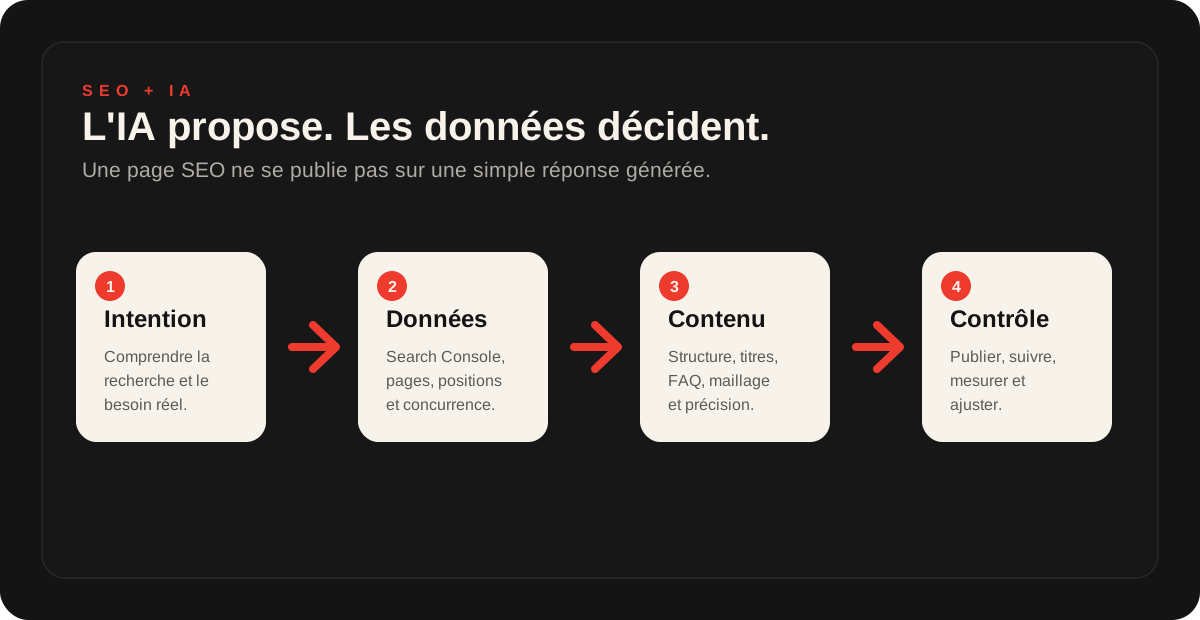
The correct approach is to use AI to structure, clarify and prepare leads, and then check with actual data before publishing. The aim is to better respond to search intent.
Central idea
AI can help improve a page. On its own, it cannot determine whether that page should be changed.
Before rewriting a page, check whether it receives impressions, which queries it appears for, which internal links support it, what it converts and what could be lost.
What AI can really do for SEO
AI is useful when it is used to improve the quality of an existing page. It can help make content clearer, more structured, more complete and easier to read. It can also help prepare variants before choosing.
01
Intention
Understand what the user is really looking for.
02
Plan
Organise H1, H2, sections, examples and FAQs.
03
Clarity
Remove vague formulations and reinforce responses.
04
FAQ
List questions that help the visitor decide.
05
Internal linking
Prepare useful and coherent internal links.
What AI doesn't see without your data
AI can comment on the text you provide. It does not automatically know your website's SEO history. It may not know which page already attracts traffic, which search query is fragile, which page must be kept or which change could break a visitor's journey.
- queries visible in Google Search Console;
- pages that actually receive impressions or clicks;
- positions already acquired;
- conversions and requests generated by the page;
- Important internal links;
- problems with speed, mobile, indexing or redirection;
- competing pages already present in Google;
- WordPress constraints, theme, SEO plugins and cache.
Prompt 1: Understanding search intent
Before improving a page, you need to know which search it answers. Otherwise, AI may offer longer, but no more useful, content.
Prompt to copy
Analyze this page with an SEO lens. Deduce the main search intent, secondary intentions, the level of maturity of the visitor and the questions he or she probably wants to answer before taking action. Don't propose a rewrite yet. Start by explaining what the page must accomplish.
Prompt 2: Check an existing page
This prompt is used to look at a page already online. It helps separate strengths, gaps and risks before writing.
Prompt to copy
Here is the text of an existing page. Analyse its SEO without suggesting keyword stuffing. Identify the answers already present, missing questions, vague passages, missing examples, titles to clarify, repetition risks and elements to preserve before making changes.
Prompt 3: Find the issues to be addressed
The right questions often improve a page without unnecessarily extending it. They must correspond to what a visitor wants to understand, compare or verify.
Prompt to copy
From this page and its subject, suggest the questions a visitor can ask himself before making a request. Class them in four groups: understanding, comparison, trust and action. For each question, indicate whether it deserves a section, a short sentence, a FAQ or a dedicated page.
Prompt 4: Improve titles without over-optimization
The titles structure the page for the reader and search engines. But a title filled with keywords can become bad for reading.
Prompt to copy
Suggest a clearer H1/H2/H3 structure for this page. Headings should help readers understand the topic without artificially repeating keywords. Explain each proposed heading's role in the reading journey and whether it answers a specific question.
Prompt 5: Preparing a useful SEO FAQ
A FAQ can strengthen a page if it answers real questions. It becomes weak when it repeats the content or promises things that the company does not hold.
Prompt to copy
Propose an SEO FAQ for this page. Each question should help visitors understand, compare or decide. Avoid artificial questions. Do not invent prices, timing, guarantees or results in the answers. Finish with questions to check with the business before using the FAQ.
Prompt 6: Find relevant internal links
Internal linking is often overlooked. AI can suggest links, but it needs to know which pages are available.
Prompt to copy
Here is a list of important pages on my website. Suggest useful internal links from the page I want to improve. For each link, give a natural anchor text, where to add it, its value to the visitor and the risk of making it feel forced.
Prompt 7: turning a recommendation into an action plan
A list of recommendations is not sufficient. It is necessary to decide what should be done now, checked first, or postponed.
Prompt to copy
Turn your SEO recommendations into an action plan. Put each action into one category: do it myself, check the data or delegate. For each action, state its possible impact, SEO risk, effort, data to check beforehand and data to monitor after publication.
Frequent errors with AI and SEO
AI becomes risky when it is only used to produce content, without analysis, preparation or verification.
Publish too fast
Put an AI text online without verifying the facts, offer, evidence and SEO data.
Multiply Pages
Create several close content that competes instead of strengthening a clear page.
Breaking the Existing
Change URLs, titles, sections, internal links or redirects without knowing what the page already delivers.
WordPress: check before changing technical settings
On WordPress, SEO enhancement can quickly touch sensitive elements: SEO plugin, meta tags, indexing, slug, redirects, cache, theme, mobile performance or internal linking. An AI recommendation may seem simple, but have effects throughout the site.
Do not change a URL without redirecting. Do not delete a page without checking its impressions. Do not change noindex/index settings without understanding the effect. Do not disable an SEO plugin because an answer seems logical to you. And keep a backup before any technical changes.
If the site is slow or the important pages are fragile, start with a site audit or a diagnostic review. AI can prepare the questions, but the correction must remain controlled.
To continue the work on your site
For a global approach, read first using AI to improve your website. To make a full first reading of the site, the article Have your site audited by ChatGPT gives the method and the limits.
If your subject is rather the home page, the page Prompts ChatGPT to improve home page provides prompts focused on clarity, conversion and calls to action.
Frequently asked questions
Can we improve the SEO of a site with AI?+
Yes. AI can help organise a page, identify useful questions, clarify titles, prepare a FAQ, improve an outline and find vague passages. It does not replace analysis of real data, competition, technical performance or internal linking.
What prompts can be used to improve the SEO of a page?+
First ask AI to identify the search intent, the questions already addressed, the missing information, the titles to be clarified, the risks of generic content and the improvements to be prioritized. The prompt must ask for a sort and a short list of ideas.
Can I publish an SEO text generated by AI?+
Avoid publishing raw AI-generated text. Reread it, check the facts, add relevant business experience, remove generic wording and ensure the page better answers the intended searches.
What data check before changing an SEO page?+
At a minimum, check impressions, clicks, queries, already positioned pages, internal links, conversions and possible technical problems. A page may seem weak in the text but already attract traffic that needs to be preserved.
What are the risks on a WordPress site?+
Risks mainly involve URL changes, redirects, deleted content, SEO plugins, index/noindex directives, caching, performance and internal linking. AI can suggest improvements, but WordPress changes need a backup and a method.
When to ask for an SEO audit instead of following the AI?+
Ask for an audit if the page is already receiving traffic, if you are preparing a redesign, if the positions have dropped, if the site is slow, if the URLs change or if you don't know which recommendations to apply without risk.
Key takeaway
AI is useful for improving SEO when it helps to clarify a page, structure ideas, find missing questions, prepare a FAQ and organize an action plan.
It becomes risky if it pushes to publish generic content, modify a page already positioned or touch WordPress without backup. The right reflex: use AI to prepare, then check the data before publishing.
Read next.

ChatGPT prompts to improve your website homepage
A selection of ready-to-copy prompts to analyse a homepage, clarify its promise, improve calls to action, prepare an FAQ and prioritise fixes without changing the website at random.
Read the article
Have ChatGPT audit your website: method, prompts and limitations
ChatGPT can provide an initial assessment of a website if you supply the right information, ask useful questions and review its recommendations before applying them.
Read the article
Use AI to improve your website: method, prompts and limitations
AI can help analyse a page, clarify a message, explore SEO improvements or improve a homepage. It does not replace a thorough technical, SEO and commercial assessment.
Read the article