Hacked WordPress cleanup: quotes, timing and cleanup steps
Redirects, malware, Google warnings or spam pages: pricing criteria, timing and what to send for a WordPress cleanup estimate.
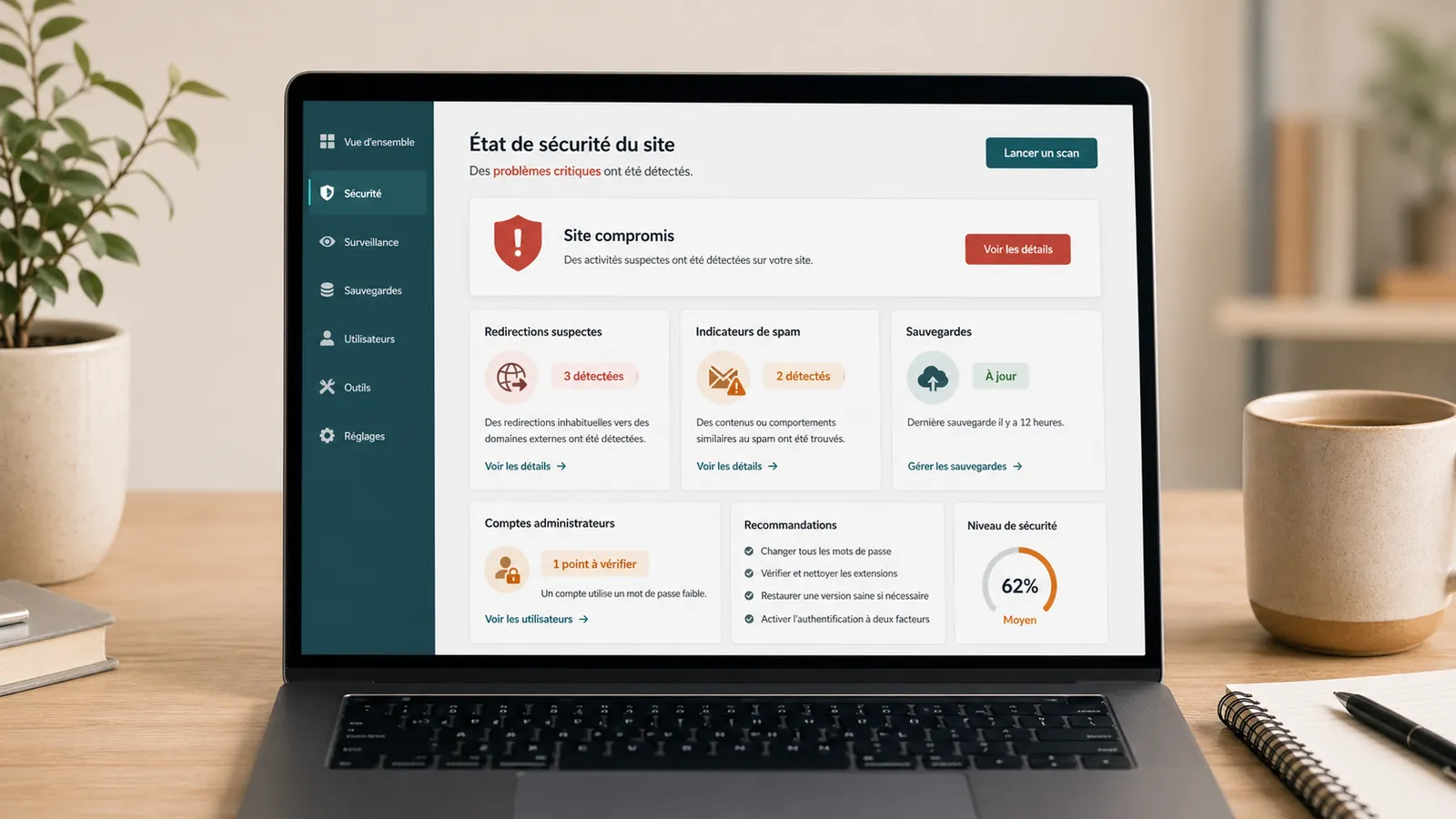
A hacked WordPress site asks two immediate questions: is it dangerous for visitors and how much will the cleaning cost? The problem can be visible, with a Google alert, suspicious redirection or blocking hosting provider. It can also be discreet: spam pages in the results, emails sent from the server, unknown admin accounts or modified files without noise.
For a small business brochure website, start by describing the symptoms and available access details. A limited infection, an active shop or a suspended site require different interventions: scope, quoting and delay are confirmed prior to cleaning.
Quick response
Limited infection
Targeted scope
Accessible brochure website, limited symptoms, access and exploitable backups.
Urgent case
Extended verifications
Redirection, Google alert, blocking hosting provider, reinfection or affected base.
To be sent
URL + alerts + access
Affected pages, screenshots, discovery date, WordPress access and hosting.
Serious cleaning must treat what is affected, understand the likely entry, secure access and avoid recurrence. Article WordPress site hacked: what to do explains the first steps; here, we focus on pricing, timing and the stages of a thorough cleanup.
Which situation matches yours?
If you are looking for a site cleaning agency hacked under WordPress or a WordPress expert, this qualification avoids approximate quotes. The price depends less on the word "hacking" than on what is actually affected.
Google redirection or alert
The site exposes visitors or displays a warning. You have to preserve the evidence, clean up and then ask for the useful Google controls or hosting provider.
Spam pages in the results
Hacking may be invisible on the site but visible for Google. Cleaning should check files, database, sitemap, accounts and old spam URLs.
Website blocked by the hosting provider
The suspension message often gives the track: malware, spam, resources or suspicious files. It must be read before restoring or deleting.
Doubt without critical symptoms
When the site remains online but appears suspicious, a diagnostic review avoids launching a heavy intervention or overwriting a still useful backup.
Redirection, Google alert or spam pages: what level of urgency?
If the site redirects to an unknown domain, if Google displays a "dangerous site" alert, if Japanese pages appear in the results or if the hosting provider suspends the account, it is necessary to act quickly. These are not simple display bugs.
In the first few minutes, the most useful thing is to document the problem: screenshots, URLs involved, host provider message, Search Console alert, date of discovery and latest known changes. An infected WordPress site may seem normal from your computer while posting spam to Google or some visitors; a serious disinfection therefore starts with a diagnostic review.
Need an estimate?
If the site is already redirected, blocked, reported by Google or suspected of malware, start with a structured estimate before editing the files. To go fast, send the elements that make it possible to distinguish a simple cleaning from a complete security recovery.
How much does it cost to clean a hacked WordPress site?
The prices displayed on the market vary greatly because not all hacks are alike. A simple redirect on a small brochure website does not have the same weight as an SEO hack with hundreds of indexed Japanese pages, an infected database, an active WooCommerce or suspended hosting.
Limited infection
Targeted scope
Timeframe confirmed after review
Accessible brochure website, symptoms identified, few plugins, no shop and exploitable backups.
To send: URL, main symptom, WordPress access and hosting.
Complex or urgent cases
Extended verifications
Timeframe depends on the extent of the problem
Redirections, affected database, hosting provider that blocks, alerts Google, reinfection or rapid intervention.
Send Google or hosting provider messages, affected pages, and information about server and database access.
High risk
In-depth review
Dependencies to be verified
WooCommerce, multi-site, compromised server, sensitive data, massive SEO hack or in-depth security audit.
To be sent: Business context, data to be preserved, backups, logs and constraints.
These situations are used to prepare the diagnostic review and scope of the quote. A very low price can be suitable for a simple and very limited intervention. It becomes risky if it promises to clean an entire site without looking at the files, database, accounts, backups, hosting and probable origin of the infection.
What makes an estimate reliable
An exploitable demand does not need to be long. To avoid a unclear quote, send as a minimum:
- The URL of the site, the pages affected and the main symptom: redirection, malware, Google alert, spam pages, blocking hosting provider or suspicious emails.
- The exact message received in Search Console, at the hosting provider or in the browser, with a screenshots if possible.
- Access details already available: WordPress, hosting, SFTP or FTP, database, domain name and Search Console.
- The type of site, the possible presence of customer data, the date of the last backups and recent changes.
If some access is lacking, intervention is sometimes possible, but the quote must take it into account. An intervention without hosting, database or exploitable backup can become slower and more risky.
What should be included in the price
To compare two rates, you have to look at the scope. Low-cost cleaning can be consistent if it is a simple case, but it must remain clear what is being checked and what is not.
- Initial diagnostic review of symptoms, hosting and alerts available.
- Save current status before deletion.
- Cleaning WordPress files, theme, plugins and suspicious uploads.
- Control of database, redirections and administrator accounts.
- Rotate access details and security keys when necessary.
- Useful updates and removal of unused plugins or themes.
- Check Search Console if Google reports a problem.
- Post-intervention recommendations to avoid reinfection.
What can cause the quote to rise: WooCommerce, compromised server, lack of access, unobtainable backups, necessary migration, large volume of spam pages, sensitive data or need a more detailed post-incident report. In these cases, one sometimes exits from the simple cleaning to enter a complete security recovery.
Signs that a WordPress site is hacked
A hacked site does not always look like an offline site. Symptoms can only appear from Google, only on mobile or only for some visitors. That's exactly what makes the diagnostic review delicate.
- The site redirects to an unknown page, sometimes only from Google.
- Google displays a "dangerous site" alert or a security warning.
- Japanese, Chinese, casino, adult or pharmacy pages appear in the results.
- Hosting provider blocks the site for malware, spam or abnormal consumption.
- Unknown admin accounts appear in WordPress.
- The site sends suspicious emails or ends up blacklisted.
- Unknown files, plugins or scripts are visible on the server.
- SEO traffic drops while the site looks normal from your computer.
If the main problem is a redirection, the article on the WordPress site that redirects to another site details this scenario. In any case, removing only what is seen can leave a door open.
What to do in the first 30 minutes?
Start by stabilising the situation rather than changing everything. Actions taken in a panic can destroy useful evidence or complicate recovery.
Immediate checklist
If the hosting provider has suspended the site, start by also understanding the exact reason for blocking. One WordPress site blocked by hosting provider can report a hack, but also a problem of resources, spam or configuration.
The steps of a serious WordPress cleaning
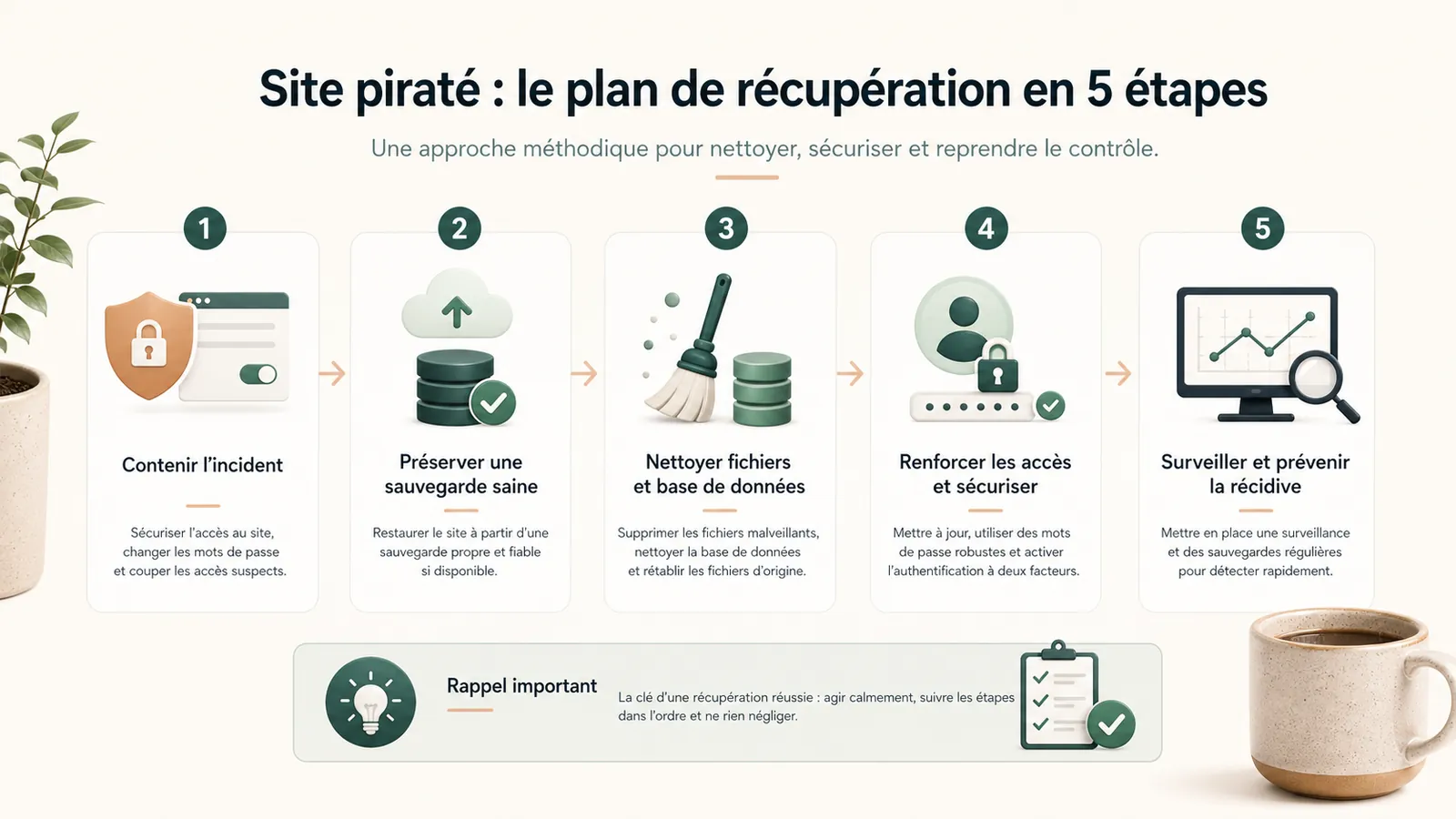
Serious cleaning follows a method. It may be more or less technical depending on the case, but it should not be limited to running a scanner and then click on "repair".
- Initial diagnostic review: symptoms, probable date, affected pages, Google alerts or hosting provider.
- Full backup of current status: files, database, useful configuration.
- Analysis of WordPress files, theme, plugins, uploads, server files and sensitive areas such as .htaccess, wp-config.php or mu-plugins.
- Database analysis: Injected scripts, redirections, unknown accounts, spam content.
- Replace WordPress, plugin and theme files with clean copies from trusted sources wherever possible.
- Removal of backdoors, fake plugins, suspicious administrator accounts and unnecessary access.
- Control server logs if available to identify the date and likely entry.
- Rotation of passwords, WordPress keys and secrets: WordPress, hosting, SFTP, database, critical accounts.
- Update WordPress, theme and plugins retained, then delete unused components.
- Hardening: external backups, permissions, 2FA if relevant, account limitation and monitoring.
- Check after cleaning: public pages, forms, accounts, logs if available, Search Console, external scan and new alerts.
Why the price varies so much
The price depends first on the level of uncertainty. A small brochure website with complete access, clear backups and limited symptoms is easier to take over than an old site, without follow-up, with lots of plugin and no history.
The budget increases if the database is infected, if hacking comes back after a first cleanup, if the hosting provider has suspended the account, if Google has indexed hundreds of spam pages, if access is incomplete or if no reliable backup is available. One WordPress backup not found often transforms a structured intervention into a more delicate recovery.
WooCommerce also adds risk. Orders, products, customer accounts, transactional emails and payments must be preserved. You don't clean an active shop like a simple brochure website.
Key takeaway
The cost of a WordPress cleaning depends on the risk: what has been affected, what needs to be preserved and what needs to be corrected to avoid recurrence.
How long does it take?
Technical cleaning can be quick in a simple case, but full return to normal can take longer. A distinction must be made between the intervention time, the verification time and the time required by Google or hosting provider to remove certain alerts.
Timing is estimated after reviewing the available access, backups and extent of infection. Cleanup time, pre-launch checks and third-party review times are separate. A recovery deadline cannot be confirmed from the symptom alone.
If Google displays an alert, site cleaning does not always remove the warning immediately. Check Search Console, explain the corrections, and request a review after complete cleaning.
If Google displays an alert or spam pages
When Google reports a WordPress malware, a "dangerous site" alert or spam pages, it is necessary to treat the subject in two steps: clean the site, then ask Google to recheck a really clean base.
In Search Console, check the "Security Issues" and "Manual Actions" reports if you have access to them. Examples of URLs provided by Google are valuable: they sometimes show pages that you don't see since normal browsing, especially if spam is displayed differently to engines.
Spam pages that were never legitimate should be removed and return HTTP 404 or 410. Redirecting all of them to the homepage can confuse the signal. Once cleaning is complete, submit a clean sitemap if needed and request a security review. The warning may disappear after approval, but some old spam URLs can remain visible in results or Search Console for a while.
Errors to avoid
Bad decisions sometimes cost more than initial hacking. They can destroy evidence, overwrite a recoverable version or leave the vulnerability active.
- Restore a backup without knowing if it is healthy: malware can come back immediately.
- Install several security plugins in emergency: a scanner helps, but does not replace cleaning.
- Change only the WordPress password: the access hosting provider, SFTP or base may also be concerned.
- Delete a suspicious file without backup: this can erase traces useful for diagnostic review.
- Forget database, admin accounts, planned tasks or hidden redirections: reinfection becomes probable.
- Put the site online without understanding the entry: Hosting provider or Google can prolong the blocking.
Full cleaning or redesign?
Hacking does not automatically justify a complete redesign. If the site is healthy in its structure, still commercially useful and technically recoverable, a clean-up followed by security may suffice.
A redesign may be more sensible if the website is very old, slow, impossible to maintain, built on an abandoned theme, filled with fragile plugins or already of little use before the incident. Decide what to preserve before starting repairs.
This decision is made after diagnostic review. Cleaning a condemned site may cost less in the short term, but more expensive if the base is to be rebuilt a few weeks later.
After cleaning: prevent the problem from coming back
Cleanup settles the incident. Maintenance reduces the risk of recurrence. After intervention, you must keep the site up to date, remove what is useless, check backups, monitor alerts, limit administrator accounts and keep an identified manager.
A WordPress maintenance with hosting may be appropriate if the website has become critical to your business. It does not promise perfect security, but helps ensure the website has ongoing support, clear backups and someone to contact when something breaks.
Frequently asked questions
How much does it cost to clean a hacked WordPress site?+
Cleaning occurs after examination of symptoms, access details and backups. The quote depends on the extent of infection, the database, possible blocking by Google or the hosting provider and the necessary controls before re-launching.
How long does it take to clean up an infected WordPress site?+
The deadline is estimated after review of the site and access. Cleaning, re-on-line and removing an alert are distinct steps. A review by Google or hosting provider depends on their own deadlines.
Do you need to restore a backup to clean up a hacked site?+
Not automatically. A backup may already contain the infection or be too old. Before restoring, you must check its date, content, quality and keep a copy of the current status of the site.
How to remove Google's dangerous site alert?+
You have to clean the site completely, fix the flaw, check the infected pages in Search Console, and then ask Google for a review. The disappearance of the alert can take a few days, sometimes more if hacking has generated many spam pages.
Why can a hacked WordPress site be infected again?+
Reinfection often happens when cleaning only removes the visible symptom without correcting the entry point: vulnerable plugin, abandoned theme, compromised admin account, weak password, hidden file, infected backup or poorly secure hosting.
What does the price of a WordPress cleaning include?+
A serious price must cover at least diagnostic review, backup before intervention, file and database cleaning, account verification, access rotation, useful updates, after-cleaning checks and recommendations to avoid recurrence.
Is the price fixed after diagnostic review?+
It can be if the scope is clear: type of site, available access, symptoms, backups, presence or not of WooCommerce, Google alert and hosting status. Without diagnostic review, a fixed price can forget important points.
What does it take to get a reliable price?+
Send the URL, visible symptoms, Google messages or hosting provider, date of discovery, available access details, site type and what you know about backups. The clearer the context, the more precise the estimate can be.
When should urgent intervention be requested?+
The urgency is real if the site redirects visitors, displays a Google alert, is suspended by the hosting provider, sends spam, exposes customer data or contains an active shop.
Should we choose an agency or WordPress expert?+
The most important is the actual scope: diagnostic, backup, files, database, access, Search Console, corrections and tracking. An agency or expert is useful when the site is commercially important or when hacking exceeds a simple visible symptom.
Can I clean myself a hacked WordPress site with a plugin?+
A security plugin can help identify some suspicious files, but it does not replace a check of files, database, accounts, access details, backups and the flaw that allowed the infection.
Conclusion: Clean quickly, but with method
A hacked WordPress website needs a prompt, considered response. Establish what was affected, preserve what can be preserved, clean it thoroughly and fix the vulnerability that caused the incident.
If your site displays an alert, redirects to another domain, contains unknown pages in Google or has been blocked by the hosting provider, start with the page hacked WordPress website cleanup. You will learn whether the website needs cleaning, restoration, an audit, a redesign or ongoing maintenance.
To get a useful estimate, send the site URL, observed symptoms, Google or hosting provider messages and available access. estimate will be more reliable than a promise of cleaning without looking at the site.
Read next.

WordPress website sending spam: what to check on the server
Has your host reported spam sent from your WordPress website or server? What to check before re-enabling email.
Read the articleMalware files reported: what should you do on WordPress?
Has your hosting provider detected malicious WordPress files? What to check, what to avoid and how to prepare cleanup without making the incident worse.
Read the articleGoogle hacked-site warning: what should you do on WordPress?
Does Google warn that your WordPress website is hacked? What to check in Search Console, what to avoid and how to request a review properly.
Read the article